Display panel shows one display at a time, with a layout map
The display panel shows one display at a time, with its brightness, text size, scale and resolution, and a layout map for arranging several. The change merged into quattro. Version 4.0.6 is the latest release.
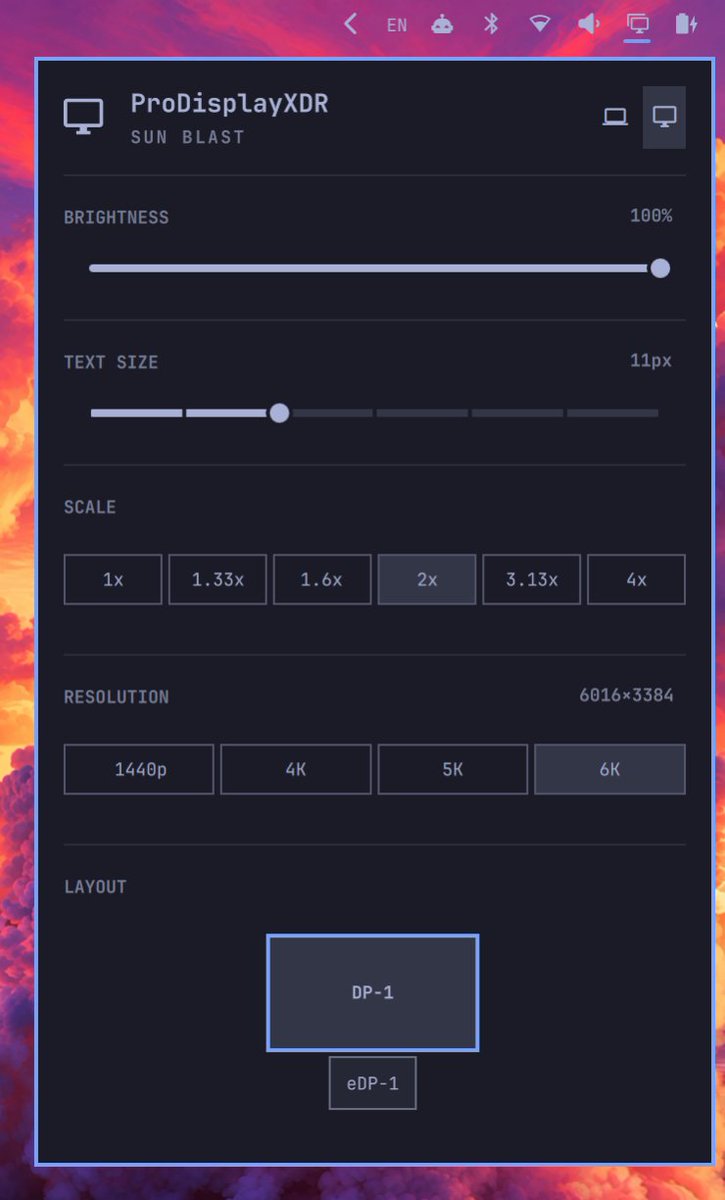
Drag one display against another's side and it lands there, snapping to that display's start, center or end. The display panel shows one display at a time, with that display's brightness, text size, scale and resolution, and a layout map for arranging several. The change merged into quattro.
The rows under the shown display are in the panel change, the refresh-rate row is in the refresh rates, and the right-click rotation is in the layout menu.
The shown display
- Brightness: per display.
- Text size: one setting for the shell font, GTK and the terminals.
- Resolution: the display's own advertised modes.
- Refresh rate: one pill per whole rate when the current resolution offers at least two rates of 60Hz or more and the fastest is above 60.
- Rotate: Normal, 90°, 180° and 270° from a right-click on the layout map.
The Omarchy account said monitor layout and resolution setting is coming for the display panel in Omarchy 4.6. Setup > Monitors leaves the Omarchy menu. Moving a display makes the shell close and reopen its per-screen windows, which looks abrupt.
A monitor that grows takes its new size in the same eval as its neighbors move, ordered so no step overlaps, in a change merged into quattro. Setting omarchy_monitor_panel_settings to false in monitors.lua leaves that file in charge of every monitor, and the panel's changes then last only until Hyprland reloads, in a change merged into quattro.